

Realme 15 Pro Android 16 Firmware Download - RMX5075 RMX5075_11.A.22 Stock ROM
Realme 15 Pro | RMX5075 | Updated November 2026
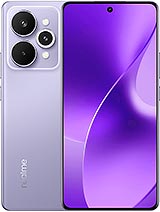
If a factory reset and a cache wipe have already failed, the next step for the 15 Pro is a complete Android 16 stock firmware install using SP Flash Tool v5.2. The package is published for Malaysia units and includes the August 2026 security patch. It also helps when an update was interrupted by a flat battery and left the phone unable to finish booting.
Do not unplug the cable while the progress bar is moving, even if the tool appears frozen for a minute. A slow first boot of five to ten minutes is normal after a full firmware write. The steps below assume a Windows PC, a working USB port and the correct driver already installed.
Firmware specification table
These are the details that matter before you download anything. Compare the model code and build string with the phone in your hand, not with a listing photo.
| Brand | Realme |
| Model number | RMX5075 |
| Device | 15 Pro |
| Android version | Android 16 |
| OS version | realme UI 7.0 |
| Firmware version | RMX5075_11.A.22 |
| Build number | RMX5075_11.A.22 |
| Region / CSC | MY (Malaysia) |
| Security patch | August 2026 |
| Firmware type | Official OFP Firmware |
| File format | ZIP (OFP package) |
| File size | 5.9 GB |
| Package contents | boot, system, vendor and modem images with an OFP manifest |
| SHA-256 | b8c951fed9b281fed05356bf2e6e6897cebe204b2a34e3b169caa40bbf1d4f4f |
Common installation errors and fixes
Most failed flashes fall into one of six patterns. Match the message on your screen with the table before you change anything on the phone.
| Problem | What to do |
|---|---|
| The OFP package is rejected as invalid | Use the latest OFP extractor and confirm that the package is for RMX5075, not for a carrier variant with a different suffix. |
| Checksum error during extraction | The download is incomplete. Delete it, clear the browser cache and download the archive again before extracting. |
| FRP or account verification appears after setup | The phone still has the previous owner's account. Official firmware does not remove account locks; use the recovery options available to the rightful owner. |
| Proximity sensor stops working after the update | Recalibrate the sensor from the hidden service menu or flash the previous build. This is a known issue on a small number of units. |
| Phone heats up and reboots during the flash | Stop the process, let the phone cool for twenty minutes and use a powered USB port. Heat during a write usually means the battery is failing. |
| Battery drains faster than before | Give the phone three charge cycles to settle, then check battery usage for a background app that is holding the device awake. |
If the phone shows a hardware fault such as a swollen battery, a cracked board or liquid damage, software cannot fix it. Stop and take the device to an authorised service centre.
Get the RMX5075 firmware package
Package RMX5075_11.A.22 is distributed as a ZIP (OFP package) of 5.9 GB for Malaysia. The same archive is used for a repair install and for a clean reinstall, so you only need to download it once.
Realme stock ROM support notes
The link above opens the brand level support page, where the package is described together with the safety notes. Keep that page open while you flash.
Load the scatter file or OFP package in SP Flash Tool v5.2, select download only for an update and firmware upgrade for a full repair.
What this firmware brings
The build is a maintenance release at heart, and most of the work sits under the hood rather than in the visible interface.
- Runs Android 16 with realme UI 7.0 on top, matching the firmware branch that shipped for this model.
- Build RMX5075_11.A.22 replaces older MY packages and keeps the Malaysia modem configuration intact.
- Touch response and proximity sensor behaviour during calls are recalibrated in this release.
- The package includes updated vendor blobs, which often fixes Bluetooth pairing problems on older builds.
- The package is a full ZIP (OFP package) image, not an incremental OTA, so it repairs partition level corruption as well.
- The boot image is signed, so the phone stays on the official verified boot chain after flashing.
Model compatibility
Compatibility is decided by the model code, not by the name printed on the box. Read this list before you connect the phone.
- RMX5075 only. The package checks the model string before it writes anything, and a mismatch stops the flash.
- Dual SIM versions sold as RMX5075 (export set) use the same system image and are covered by this build.
- Regional codes EX (Global export), IN (India), ID (Indonesia), TH (Thailand) share the same hardware, but flashing a different CSC changes carrier settings and may disable local features.
- Do not flash a 5G variant with this package. The modem firmware and partition table are different.
- Carrier locked units should stay on the CSC that matches the SIM lock, otherwise the phone may ask for a network code after boot.
Installation instructions
The process below is the one that matches this package. Read every step before you touch the phone, and keep the log window visible so you can see where a failure happens.
- Install Realme USB Driver 1.0.5 and extract SP Flash Tool v5.2 and the firmware archive on the PC.
- Open the scatter file inside the package if the tool asks for one. For OFP packages, load the .ofp file directly.
- Power off the phone and remove the SIM tray if the model requires it.
- Hold Volume Up and connect the USB cable to enter download or EDL mode. The tool should detect the port.
- Select Download Only for an update that keeps data, or Firmware Upgrade for a full repair.
- Press Download or Start and wait while the tool writes the partitions.
- Do not touch the phone until the tool reports a green success message.
- Disconnect the cable and hold Power for ten seconds if the phone does not restart by itself.
- Check the build number in Settings after the first boot to confirm the flash worked.
Required drivers and tools
Use the versions listed here unless the brand support page says otherwise. Mixing an old flashing tool with a new bootloader is the usual reason a flash fails at the first partition.
| Item | Version | Purpose |
|---|---|---|
| USB driver | Realme USB Driver 1.0.5 | Lets Windows recognise the phone in download or fastboot mode. |
| Flashing tool | SP Flash Tool v5.2 | Writes the firmware partitions and checks the package signature. |
| Archive tool | 7-Zip 24.08 | Extracts tar, tgz and zip packages without corrupting them. |
| PC requirements | Windows 10 or 11, 8 GB RAM, 15 GB free disk | Enough space for the archive, the extraction and the log files. |
Firmware screenshots
The images below show the screens to compare before and after flashing. Keep the same file names and alt text if you replace them with your own captures so search engines can still match them to the model.

File name: 15-pro-rmx5075-about-phone.svg | Alt text: Realme 15 Pro RMX5075 about phone screenshot

File name: 15-pro-rmx5075-software-information.svg | Alt text: Realme 15 Pro RMX5075 software information screenshot

File name: 15-pro-rmx5075-firmware-package.svg | Alt text: Realme 15 Pro RMX5075 firmware package screenshot

File name: 15-pro-rmx5075-flashing-tool.svg | Alt text: Realme 15 Pro RMX5075 flashing tool screenshot
Firmware FAQ
Can I flash only the system file?
A repair install needs every image in the archive. Writing a single system file often leaves the modem and regional settings untouched, so the phone can boot with the old faults still in place.
Does it work on the dual SIM version?
Yes, the RMX5075 (export set) variant uses the same system image. The model check may still display the single SIM name, which is normal.
Do I need to root the phone first?
No. Root is not required and can actually cause the flash to fail on devices with verified boot. Use the official package on an unmodified phone.
The file size looks different from the listing. What now?
Compare the SHA-256 value rather than the size in megabytes. Different browsers report compressed sizes slightly differently, but the hash must match exactly.
Why does my phone show a different region after flashing?
The CSC or region code in the package decides that. Flash the build for the country where you use the phone if you want local carrier features and update servers.
Will this remove a Google account or FRP lock?
No. Official firmware does not bypass account verification. Only the rightful owner can remove the account through the normal recovery process.
How long does the first boot take?
Expect five to ten minutes. The phone rebuilds the runtime cache and verifies the system partition, so a slow first start is normal.
