

Huawei Nova 4 VCE-LX1 Firmware Download - VCE-LX1 10.0.0.368(C636E7R1P3) (Android 10)
Huawei Nova 4 | VCE-LX1 | Updated November 2026
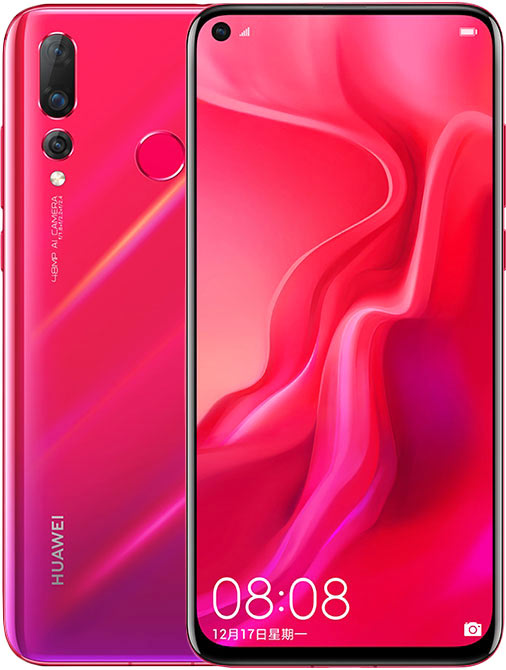
A soft bricked Nova 4 is rarely dead. In most cases the hardware is fine and only the system partition needs to be written again with a signed Android 10 image. The package is published for Asia Pacific units and includes the December 2022 security patch. It is the right file when the phone hangs on the logo, restarts during calls or shows a system UI error after an update.
Charge the battery above 50 percent and use the original USB cable if you can find it. If the phone still boots, write down the current build number before you start so you can compare it afterwards. The steps below assume a Windows PC, a working USB port and the correct driver already installed.
Regional packages explained
Huawei ships the same hardware with different regional packages. The CSC or region code decides which carrier profiles, languages and update servers the phone uses after flashing.
| Code | Region | Build |
|---|---|---|
| C432 | Europe | VCE-LX1 10.0.0.368(C432E7R1P3) |
| C636 | Asia Pacific | VCE-LX1 10.0.0.368(C636E7R1P3) |
| C185 | Middle East | VCE-LX1 10.0.0.368(C185E7R1P3) |
| C461 | India | VCE-LX1 10.0.0.368(C461E7R1P3) |
| C10 | Russia | VCE-LX1 10.0.0.368(C10E7R1P3) |
The bold row is the package described on this page. If you are repairing a phone for use in another country, choose the row that matches the SIM you will actually use.
Inside the firmware package
The archive is not a single file. Knowing which image does what helps you understand why a partial flash can leave the phone half working.
| Image | Approx. size | Purpose |
|---|---|---|
| boot.img | 0.09 GB | Kernel and ramdisk used during startup. |
| system.img | 2.26 GB | Android system, preinstalled apps and framework files. |
| vendor.img | 1.03 GB | Hardware libraries, camera and modem interfaces. |
| product.img | 0.66 GB | Regional apps, themes and carrier customisation. |
| modem.img | 0.14 GB | Radio firmware for the Asia Pacific network bands. |
Extracted sizes vary by region and by the compression method used. The numbers above are close estimates for this 4.7 GB package, not a guarantee.
Post flash checklist
A successful write is only half the job. These checks catch the small problems that are easier to fix before you rely on the phone again.
- Open Settings, About phone and confirm the build number matches VCE-LX1 10.0.0.368(C636E7R1P3).
- Test calls, mobile data, Wi-Fi and Bluetooth before you restore your apps.
- Check that the fingerprint sensor and face unlock still work. A clean flash usually keeps them, but it is worth confirming.
- Run the camera in photo and video mode for a minute to make sure the image stabilisation initialises.
- Restore your backup only after the phone has settled for ten minutes, otherwise the restore competes with background setup.
If the build number still shows the old value, the flash did not complete. Repeat the process with a fresh extraction rather than flashing the same half unpacked folder again.
Nova 4 firmware download links
Package VCE-LX1 10.0.0.368(C636E7R1P3) is distributed as a ZIP (dload with UPDATE.APP) of 4.7 GB for Asia Pacific. The same archive is used for a repair install and for a clean reinstall, so you only need to download it once.
Huawei stock ROM support notes
If the download stops halfway, delete the partial file and start again. A truncated archive is the most common cause of a checksum error in DC-Phoenix.
Copy the dload folder to a formatted SD card or use DC-Phoenix, then let the phone verify UPDATE.APP before it installs.
Firmware details at a glance
These are the details that matter before you download anything. Compare the model code and build string with the phone in your hand, not with a listing photo.
| Brand | Huawei |
| Model number | VCE-LX1 |
| Device | Nova 4 |
| Android version | Android 10 |
| OS version | EMUI 10.0 |
| Firmware version | VCE-LX1 10.0.0.368(C636E7R1P3) |
| Build number | VCE-LX1 10.0.0.368(C636E7R1P3) |
| Region / CSC | C636 (Asia Pacific) |
| Security patch | December 2022 |
| Firmware type | Official dload Firmware |
| File format | ZIP (dload with UPDATE.APP) |
| File size | 4.7 GB |
| Package contents | UPDATE.APP, cust and preload images with a version manifest |
| SHA-256 | cba856d9a947689b835121089cc0a98ef2d831e79ff2832a86ce54cd530a5b92 |
Step by step flashing guide
The process below is the one that matches this package. Read every step before you touch the phone, and keep the log window visible so you can see where a failure happens.
- Install Huawei HiSuite 11.0.0 and Huawei DC-Phoenix 1.0.0.8 on the PC.
- Extract the firmware ZIP. Inside you should find an UPDATE.APP file and a dload folder structure.
- Copy the dload folder to the root of a formatted SD card, or connect the phone in HiSuite mode.
- On the phone, open Settings, System and update, then choose local update if the option is available.
- If the phone cannot boot, hold Volume Up and Volume Down while pressing Power to trigger the forced dload install.
- Wait while the phone verifies UPDATE.APP. This can take several minutes and the screen may stay at 5 percent.
- Do not remove the SD card or cable until the progress bar reaches 100 percent and the phone restarts.
- After the first boot, check the build number and confirm that the regional cust partition was installed.
What the update changes
The build is a maintenance release at heart, and most of the work sits under the hood rather than in the visible interface.
- Build VCE-LX1 10.0.0.368(C636E7R1P3) replaces older C636 packages and keeps the Asia Pacific modem configuration intact.
- Battery drain reports that followed the previous patch are addressed in this build, according to the changelog summary.
- The package is a full ZIP (dload with UPDATE.APP) image, not an incremental OTA, so it repairs partition level corruption as well.
- Charging behaviour at low battery percentages is tuned to reduce heat during fast charging.
- App launch time and memory management changes are rolled into this build alongside the security patch.
- Security patch level is December 2022, which covers the vulnerabilities listed in that month's Android bulletin.
Error messages and what they mean
Most failed flashes fall into one of six patterns. Match the message on your screen with the table before you change anything on the phone.
| Problem | What to do |
|---|---|
| The tool cannot see the phone at all | Check Device Manager for an unknown device, reinstall the driver and try a cable that supports data rather than charging only. |
| DC Phoenix cannot detect the device | Install HiSuite first so the driver registers, then open DC Phoenix as administrator and connect the phone in upgrade mode. |
| Cust partition mismatch after the flash | The package includes a cust image for another region. Flash the correct regional dload package to restore carrier settings. |
| The phone says update.app not found | The dload folder must sit in the root of the SD card, with UPDATE.APP inside it. Rename the folder only if the guide for your EMUI version says so. |
| Phone heats up and reboots during the flash | Stop the process, let the phone cool for twenty minutes and use a powered USB port. Heat during a write usually means the battery is failing. |
| Stuck on the brand logo after a successful flash | Boot to recovery, wipe cache and data, then restart. If it still fails, the package may be for a different regional variant. |
If the phone shows a hardware fault such as a swollen battery, a cracked board or liquid damage, software cannot fix it. Stop and take the device to an authorised service centre.
Screens to compare
The images below show the screens to compare before and after flashing. Keep the same file names and alt text if you replace them with your own captures so search engines can still match them to the model.

File name: nova-4-vce-lx1-about-phone.svg | Alt text: Huawei Nova 4 VCE-LX1 about phone screenshot

File name: nova-4-vce-lx1-software-information.svg | Alt text: Huawei Nova 4 VCE-LX1 software information screenshot

File name: nova-4-vce-lx1-firmware-package.svg | Alt text: Huawei Nova 4 VCE-LX1 firmware package screenshot

File name: nova-4-vce-lx1-flashing-tool.svg | Alt text: Huawei Nova 4 VCE-LX1 flashing tool screenshot
Common questions
The file size looks different from the listing. What now?
Compare the SHA-256 value rather than the size in megabytes. Different browsers report compressed sizes slightly differently, but the hash must match exactly.
Will flashing erase my data?
A full flash wipes the internal storage. If you choose the keep data option in the flashing tool, your files can survive, but a backup is still the safer choice.
Which flashing tool version should I use?
Huawei DC-Phoenix 1.0.0.8 is the version that matches this build. Newer tools usually work, but avoid very old releases because they may not recognise the partition layout.
Will this remove a Google account or FRP lock?
No. Official firmware does not bypass account verification. Only the rightful owner can remove the account through the normal recovery process.
Can I downgrade to an older build?
Only if the bootloader revision on the package is equal or newer than the one already on the phone. Older revision numbers are rejected at the verification stage.
Why does my phone show a different region after flashing?
The CSC or region code in the package decides that. Flash the build for the country where you use the phone if you want local carrier features and update servers.
Can I install this firmware without a PC?
No. Huawei DC-Phoenix 1.0.0.8 needs a Windows computer and a USB cable. OTA updates are different, but this package is a complete image that has to be written from a PC.
